
Mitsubishi Outlander: Floor Console Assembly
Mitsubishi Outlander 2007-2013 Service Manual / Body, Exterior, Interior and Supplemental / Interior / Floor Console Assembly
FRONT FLOOR CONSOLE ASSEMBLY
REMOVAL AND INSTALLATION
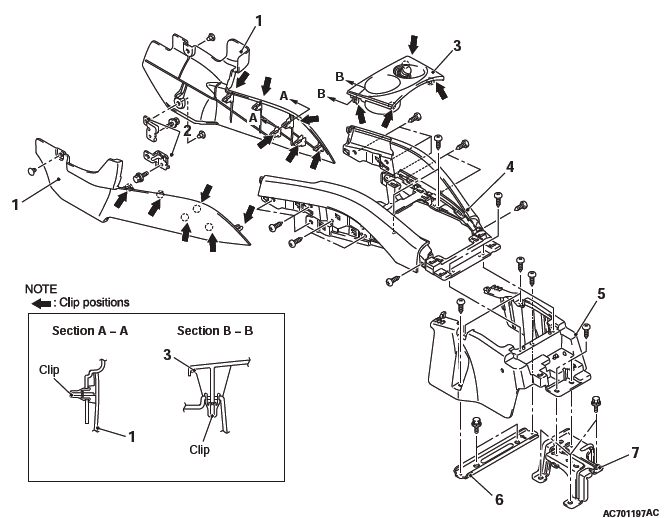
Removal steps
- Lower side cover
- Front floor console bracket
- Front floor console panel
- Rear floor console assembly
- Front floor console assembly
- Interior transmission antenna
- Front floor console base
- Front floor console base bracket
- Front floor console mid bracket
REAR FLOOR CONSOLE ASSEMBLY
REMOVAL AND INSTALLATION
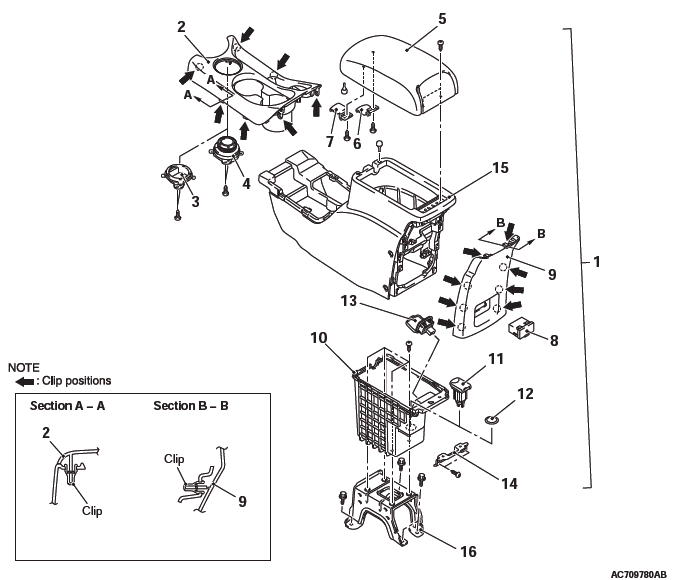
Removal steps
- Rear floor console assembly
- AWD selector switch connector
- Rear floor console front panel assembly
- Floor console plug <FWD>
- Drive mode selector <AWD>
- Armrest assembly
- Armrest box lever
- Rear floor console box lever
- VTR adapter assembly
- Rear floor console rear panel
- Rear floor console box
- USB adapter
- Accessory socket
- Cigar lighter plug
- AC inverter socket
- Rear floor console box bracket
- Accessory socket connector
- VTR adapter connector
- Rear floor console
- Rear floor console bracket
REMOVAL SERVICE POINT
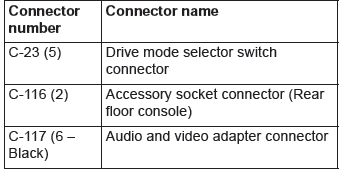
WIRING HARNESS CONNECTOR DISCONNECTION
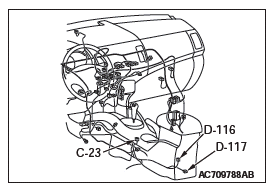
Disconnect the following wiring harness connectors:
READ NEXT:
 Trims
Trims
INTERIOR TRIM
REMOVAL AND INSTALLATION
Removal steps
Front scuff plate
Cowl side trim
Rear scuff plate
Front door opening trim
Rear door opening trim
Front pillar trim
Garnish clip
Center pi
Seat Assembly
FRONT SEAT ASSEMBLY
REMOVAL AND INSTALLATION
CAUTION
To remove the front seat assembly of vehicle with side air bag, refer to
GROUP 52B - Service Precautions and Curtain Air Bag Module.
Removal step
SEE MORE:
On-vehicle Service
ID CODES REGISTRATION PROCEDURE
REGISTRATION USING SCAN TOOL MB991958
(M.U.T.-III SUB ASSEMBLY)
Required Special Tools:
MB991958 Scan Tool (M.U.T.-III Sub Assembly)
MB991824: Vehicle Communication Interface (V.C.I.)
MB991827 M.U.T.-III USB Cable
MB991910 M.U.T.-III Main Harness A
The ID
Diagnostic Function
WARNING INDICATOR
When any malfunction occurs in the items related to the CVT
system, which are described below, the symbol (A) continues
being displayed in the information screen in the multi information
display.
Check if the diagnostic trouble code is set when the symbol (A)
continues being displ
© 2010-2026 Copyright cw.mioutlander.com
